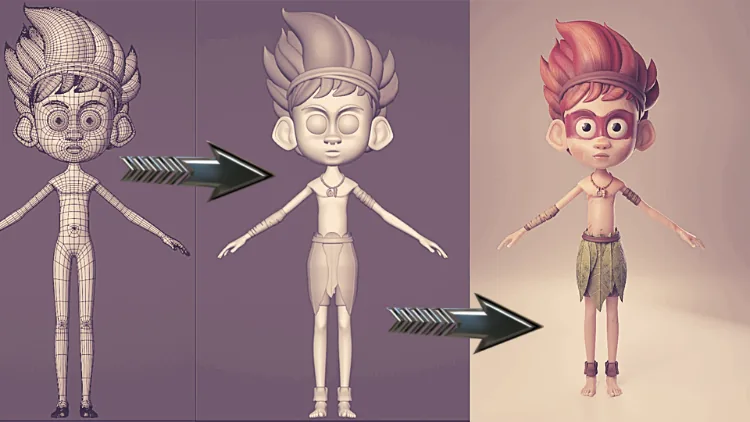
Creating a fully realized 3D character — from concept to final render — is one of the most ambitious and satisfying things you can do in Blender. This 18-video character modeling course walks you through the entire pipeline from start to finish, step by step.
Course Overview
This is a comprehensive, project-based course. You won't just watch theory — you'll build a real character alongside Junaid Alam, learning every stage of the professional character creation pipeline used in games, film and animation.
What You'll Cover — All 18 Videos
- Video 1–2: Fundamental concepts and setting up reference images
- Video 3–5: Building the base mesh — body proportions and topology
- Video 6–8: Head and face modeling — eyes, nose, mouth, ears
- Video 9–10: Sculpting — adding organic detail and surface definition
- Video 11–12: Fine details — clothing, accessories and secondary elements
- Video 13–14: UV unwrapping and texture painting
- Video 15–16: Rigging with AutoRig Pro — bones, weights and controls
- Video 17: Lighting setup for character presentation
- Video 18: Final rendering — exporting a portfolio-quality image
Tools & Techniques Covered
- Blender's modeling and sculpt modes
- Reference image setup and proportion matching
- Clean quad topology for animation-ready meshes
- UV unwrapping workflows
- Texture painting and PBR material setup
- AutoRig Pro — industry-standard auto-rigging addon
- HDRI and three-point lighting for character renders
- Cycles and EEVEE rendering comparison
Who Is This For?
This course suits intermediate Blender users who already know the basics of navigation and modeling and are ready to take on a complete character project. If you're a complete beginner, start with the free crash course first.
Enroll on Udemy
The full course is available on Udemy. Click below to get access and start modeling your first complete character today.